Guide · updated 13 August 2026
How to open a large log file on macOS
A log file too big for a text editor is not too big for a Mac. Terminal already has three tools that do not care how large the file is — less, tail and grep — and there are graphical viewers built for multi-gigabyte files. What fails is the editor, because an editor has to hold the whole file in memory; a pager or a log viewer never does.
Free, installed, works right now
Start in Terminal
less is on every Mac and has no practical file-size limit, because it reads only the part of the file it is currently showing. This works on a 50 GB file on a laptop with 8 GB of RAM.
less /path/to/huge.log
Inside it:
Gjumps to the end,gto the start/patternsearches forward,nandNmove between matches&patternshows only the lines that match — a filter, kept until you clear it with&and an empty patternFfollows the file as it grows, liketail -f; Ctrl-C returns to normal paging with everything you just watched still scrollable. Start that way withless +F file.log— note the plus.less -Fwith a minus is a different option entirely (“quit if one screen”)-Non the command line turns on line numbers,-Sstops long lines wrapping
When you know what you are looking for, cut the file down instead of browsing it. The result is small enough for any editor:
# the last 500 lines
tail -n 500 huge.log

# follow a live file, surviving log rotation
tail -F /var/log/app/current.log

# pull every error into a file you can actually open
grep -n 'ERROR\|FATAL' huge.log > errors.log

# how big is it, really
wc -l huge.log && ls -lh huge.log
For searching, ripgrep is worth the one-line install. The grep that ships with macOS is the BSD one, version 2.6.0, which is old and has no PCRE support; rg is markedly faster on large inputs and searches a whole directory of rotated logs without any extra syntax:
brew install ripgrep
rg -n 'connection refused' /var/log/app/
If none of this is enough, it is usually for one of two reasons: you want to keep a filter and still look at what surrounds a matching line, or you want to watch a file live while searching what already went past. That is the point at which a viewer earns its place.
The thing everybody tries first
Why your editor can’t open it
A text editor is built to edit. That means holding the document in memory and building the structures editing needs — an undo history, syntax state, a map of every line so the cursor can be put anywhere. All of it scales with the size of the file, and none of it is free. Past a certain point the editor either refuses to open the file, opens it with most of its features switched off, or opens it and becomes unusable.
This is a design decision rather than a bug, and it is why the answer is a different kind of program rather than a bigger machine. A pager reads the bytes it is displaying. A log viewer memory-maps the file and indexes where the lines start, so the size of the file stops being the size of the problem.
Editors are what most people try second, and they fail in stages. First they switch their own features off — syntax highlighting, folding, wrapping — to stay responsive. Then they warn before opening. Then, at some size, they refuse or run out of memory, and where that point sits differs by editor and by version. The reason is the same throughout: an editor holds the document because it has to be able to change it, and that cost scales with the file. It is a reasonable design for editing and the wrong shape for reading a log — you wanted to look at the thing, and you are paying for the ability to rewrite it.
One more thing worth knowing, because it is the opposite of what people assume: Console will open a plain-text log — macOS registers Console as the owner of the .log file type, so double-clicking one sends it there. What you get is a bare read-only viewer. Console is built around the unified logging system, the stream you would otherwise query with log show, and none of that filtering applies to a plain file; Apple’s own Console documentation covers only log messages, activities and reports. So “my log opened in Console and it is useless” is the common experience, and it is not the tool you want for a multi-gigabyte file.
The options
What to use, and when
| What it is | Cost | File size | Best at | Where it stops | |
|---|---|---|---|---|---|
| less | Terminal pager, preinstalled | Free | Any size — it reads only what it shows | Looking now, on any Mac, including over SSH | No mouse, no persistent filters, one file at a time |
| tail / grep | Terminal, preinstalled | Free | Any size | The last N lines; pulling matching lines out to a smaller file | Every question is a fresh full scan |
| ripgrep (rg) | Terminal search, via Homebrew | Free, open source | Any size | Searching fast, and searching a whole directory of logs | Search only — no browsing, no follow |
| lnav | Terminal log navigator, via Homebrew | Free, open source | Large files, with indexing | Structured logs, SQL over log records, merging several files by time | Terminal UI, and a real learning curve |
| klogg | Qt desktop log viewer | Free, open source (GPL-3.0) | Built for very large files | A graphical viewer with search and filtering, on any platform | Qt, not Mac-native. Last stable release June 2022, and that build is Intel-only — it runs under Rosetta on Apple silicon |
| Chipmunk | Rust + Electron log and trace viewer | Free, open source (Apache-2.0) | Built for large traces | Actively developed, and it ships a native Apple-silicon build | Electron interface; aimed at trace analysis as much as at log reading |
| BBEdit | Mac text editor with a large-file reputation | $59.99 once, with a free mode | Large, but it is still an editor | Editing a big file rather than only reading it | An editor, so it holds the document in memory to be able to change it; no level filters or follow mode |
| LogRider | Native macOS log viewer (AppKit) | $19 once | Multi-gigabyte, memory-mapped | Search, level and regex filters, context and follow in one window; search across every open file | macOS only, read-only, no diff in 1.0 |
Versions, prices and licences checked 13 August 2026. These are statements about what each tool is, not benchmarks: the only application whose performance we have measured is our own, and its numbers are below with the machine and cache state they were taken on. Where a claim here is a vendor claim rather than something checkable, it is not in the table.
Choosing
A short decision list
- You need to look at it once, now.
less. It is already installed, it opens anything, and it works over SSH where a GUI cannot go. - You know the string you want.
greporrginto a smaller file, then open that anywhere. - Your logs are structured and you want to query them. lnav. SQL over log records and timeline-merging several files is genuinely something no GUI here replaces.
- You want a free graphical viewer. klogg, if you do not mind that the stable build is from 2022 and runs under Rosetta on Apple silicon. Chipmunk is the actively developed free option and ships a native Apple-silicon build.
- You need to edit the file, not only read it. BBEdit. It has the best large-file reputation of any Mac editor and has a free mode, but it is an editor: it holds the document in memory because it has to be able to change it, and it has no level filters or follow mode.
- You are on a Mac and you do this often. A native viewer that keeps search, level and regex filters, context lines and follow mode in one window is worth an hour’s pay. That is what LogRider is for.
Ours
LogRider, and what it measures
LogRider is a native macOS viewer for logs too big to open: a C++17 memory-mapped engine under a real AppKit interface, read-only by design. It requires macOS 12.0 Monterey or later and ships as a universal binary for Apple silicon and Intel. It costs $19 once, and the trial is simply the download — 7 days, every feature unlocked, no card, no email and no account.
Opening a file builds a sparse line index first, and nothing is on screen until that finishes — there is no partial first screen, so on a very large file you wait, and then everything is fast. Figures below were measured on an M2 Max with 32 GB, on internal SSD, release build, in August 2026. They are Apple-silicon numbers.
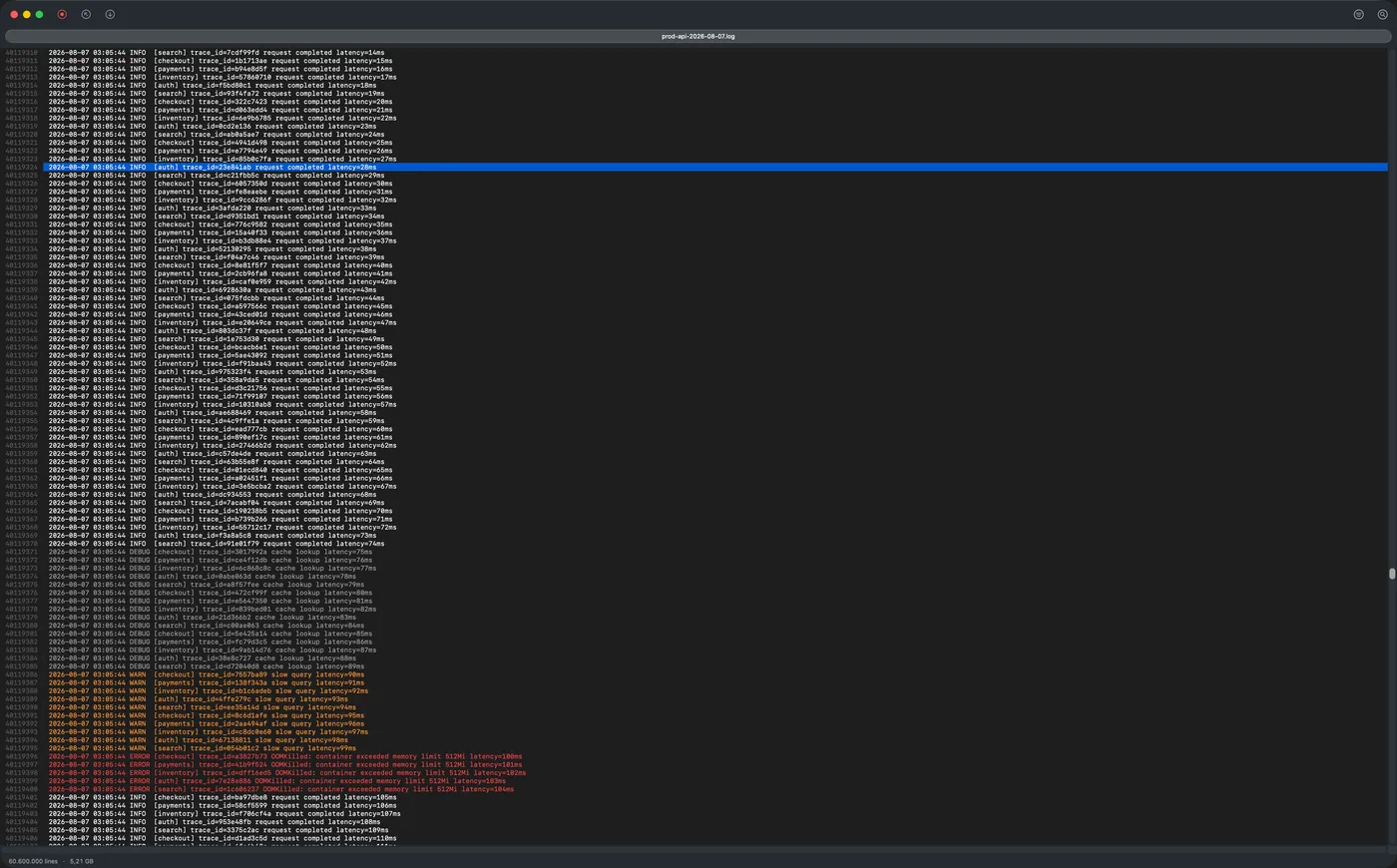
OOMKilled cascade in view. The status bar in the picture shows the size the app read off disk.| 1 GB · 12.5M lines | 4.9 GB · 60.6M lines | |
|---|---|---|
| Index on open | 2.3 s cold · 0.3 s cached | about 13 seconds |
| Filter to one log level | 0.06 s cached | under 8 seconds |
| Literal search, whole file | 0.07 s cached | — |
The 4.9 GB file is larger than the page cache on a 32 GB machine, so storage is the ceiling for it; “cached” means the file was already in the page cache. We publish no MB/s figure, because cache state moves throughput by roughly 28x and a single number would be a cached measurement presented as a general one. Full feature list and screenshots are on the LogRider page.
What it does not do in 1.0, stated here so nobody finds out after paying: no file comparison or diff, no folder comparison or three-way merge, no Kubernetes log streaming, no syntax highlighting, no minimap and no custom highlight rules. macOS only — there is no Windows or Linux build.
Questions
Frequently asked
How do I open a 5 GB log file on a Mac?
Three options, in order of how quickly you can start. In Terminal, "less /path/to/file.log" opens a file of any size immediately, because it only reads the part it is showing; press G for the end, / to search, F to follow. To pull out just what matters, "grep -n ERROR file.log > errors.log" gives you a small file any editor can open. For a graphical viewer that keeps filters, context and follow in one window, use a viewer built for large files — klogg is free, open source and cross-platform, and LogRider is a native Mac app at $19 with a 7-day trial that needs no card and no account.
Why can't TextEdit or my code editor open a huge log?
A text editor is built to edit, which means holding the whole document in memory along with everything editing needs: undo history, syntax state, a line map for the entire file. That cost grows with the file, so editors degrade in stages — first by switching their own features off to stay responsive, then by warning you before they will open the file at all. Modern editors will often open something far larger than people expect; the problem is what it costs them, and that you only wanted to read it. Pagers and log viewers avoid the whole question by never holding the file: they read the bytes on screen and index only where the lines start.
Can Console.app open a large log file?
Yes, and this surprises people: Console registers itself as the owner of the .log file type, so double-clicking a plain-text log opens it in Console rather than in an editor. What you get is a bare read-only viewer — none of the unified-log filtering applies to a plain file, and Apple's Console documentation covers only log messages, activities and reports, so the behaviour is undocumented and not something to rely on. If you have landed in Console with a multi-gigabyte log and it is not giving you what you need, the tool you want is a pager such as less, or a viewer built for large files.
Is there a Notepad++ for Mac that opens big files?
Notepad++ is Windows software and has no macOS build; running it under Wine or a VM is the only way to get the actual application. For the thing people usually want from it on a Mac — opening a file too large for a normal editor — the equivalents are klogg or lnav if free matters most, or a native Mac viewer such as LogRider.
What is the Mac equivalent of glogg or klogg?
klogg is the fork that succeeded glogg, and it does run on macOS, so the direct answer is: use klogg. Two things to know first. glogg itself is finished — its last release was 1.1.4 in May 2017. And klogg's last stable release was 22.06 in June 2022, which is the version Homebrew installs and which is an Intel-only build, so on an Apple silicon Mac it runs under Rosetta; a native arm64 build exists only in a 2024 prerelease. If you want the same job done by a Mac-native application — a universal binary, real AppKit windows and tabs, system appearance, standard shortcuts — LogRider is that, at $19 with a 7-day trial that needs no card and no account.
Is there a GUI alternative to lnav?
lnav is a terminal application, and much of its power — SQL queries over log records, automatic format detection, merging several files on a shared timeline — has no direct graphical equivalent. If what you want from a GUI is scrolling, searching, filtering by level or regex, and following a live file with the mouse, klogg and LogRider both do that; lnav remains the better tool for querying structured logs.
How do I follow a file that is being written, like tail -f?
The command "tail -f file.log" prints new lines as they arrive, and "tail -F" with a capital F additionally re-opens the file when it is rotated or replaced, which is what you want for anything managed by logrotate. Inside less, pressing F follows in the same way and Ctrl-C drops you back into normal paging, which is often more useful because you can then search and scroll back through what already went past; less does not survive rotation, though, so it is tail -F for a file that gets rolled. In a GUI viewer this is usually called follow mode, and the ones worth using let you pause the view without stopping the read.
What is the largest log file LogRider has been measured on?
4.9 GB and 60.6 million lines, on an M2 Max with 32 GB, on internal SSD — larger than that machine's page cache, so storage is the ceiling. It takes about 13 seconds to index when opened, with an empty window until that finishes, after which filtering the whole file to a single log level takes under 8 seconds. Nothing in the app caps file size, because the file is memory-mapped rather than read into memory, but 4.9 GB is the largest size we have published numbers for.