Engineering · 14 Aug 2026
What it takes to put a 5 GB log on screen
A log too big for an editor is not a bigger version of a small one. It is a different problem, and most of the work is in refusing to do the obvious thing.
This started with an ML pipeline. The logs it produced were routinely over 500 MB, and what finally became intolerable was not the size on its own. It was that searching kept throwing me to the end of the file. Not because follow was on — I turned follow off, and the version of Console I was using did it anyway. Every time I went looking for something that had already happened, I landed back at the tail.
That is a small thing that becomes a large one. You are trying to hold a position in a file and ask a question about it, and the tool keeps moving the position.
Open a 5 GB log in a text editor and watch what happens. Some editors refuse. Some open it and then quietly switch off syntax highlighting, folding and wrapping to stay upright. Some take the file and then die several minutes later when a search allocates one buffer too many. The exact behaviour differs by editor and by version, and none of it is a bug — it is the consequence of what an editor is for.
An editor holds the document, because it has to be able to change it. That means the bytes, plus an undo history, plus a line map, plus whatever the syntax engine is keeping. The cost is some multiple of the file size, and the multiple does not shrink as the file grows. You wanted to look at the thing, and you are paying for the ability to rewrite it.
What follows is how the engine behind LogRider avoids that, which is mostly a list of things it declines to do. Every constant below is from the C++ source, and every timing was measured on an M2 Max with 32 GB, on internal SSD.
Never read the file
The file is memory-mapped, in a window of 64 MB. The engine asks the kernel to map a region of the file into the address space and then reads from that region as if it were memory. Nothing is copied. The kernel pages in the parts that are actually touched and evicts them under pressure, because it is already the thing that decides what stays in RAM.
This is why an 8 GB file does not need 8 GB of RAM, and it is also why resident memory is a misleading number to quote: most of what the process “has” is clean, file-backed, and reclaimable the moment anything else wants it. Activity Monitor will show you a large figure and be technically correct and practically useless.
Never scan to find a line
Lines are not fixed width, so line 40 million is at an unknown byte offset. The naive answer is to scan from the start counting newlines, which is O(n) per jump and hopeless. The other naive answer is to store every line offset, which for 60 million lines is hundreds of megabytes of index for a file you are only reading.
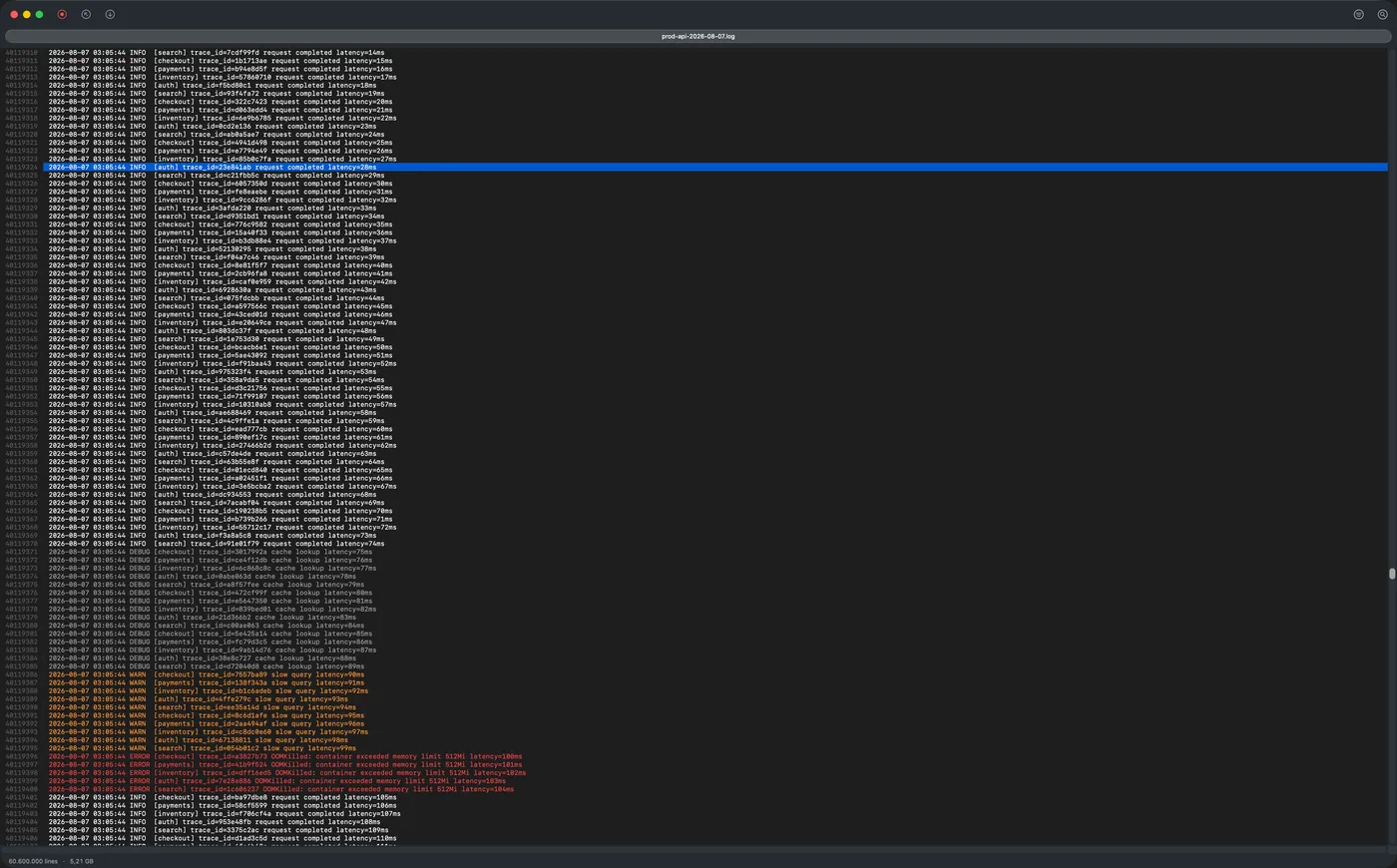
Instead there is a checkpoint every 1000 lines. To reach line 40,119,318 the engine binary-searches the checkpoints, lands within 999 lines, and scans forward from there. The index is a thousandth of the size and the lookup is a binary search plus a short bounded scan. Building it is parallelised above 10 MB.
The visible consequence: a scrollbar you can drag to the middle of a 60-million line file and have it land, rather than a viewer that only moves forwards.
Never let a regex run away
Search uses RE2, which has no backtracking and therefore runs in time linear in the input. This rules out a class of pattern that is fine on a small file and hangs forever on a large one — the nested-quantifier shapes that make backtracking engines explode. It costs you lookahead and backreferences, which RE2 does not support.
That trade is what makes the timing honest rather than hopeful. A regex across 23 million lines that matches 7.2 million of them completes in 0.20 s on a cache-resident 1.99 GB file. There is no pattern a user can type that turns that into minutes.
Millions of matches are then stored as ranges rather than as a list of line numbers, because “lines 4,000,000 to 4,250,000 match” is two integers and the list is a quarter of a million of them.
Pay the cost once, at the door
All of that has one consequence worth stating plainly, because it is the trade the whole design makes: the index is built before anything appears on screen. Opening a file is not instant. On a 4.9 GB log it is about 13 seconds of waiting, and then the entire file is available at once.
That is the deal. You spend the time once, at the door, and afterwards every question you ask of the file is answered against a structure that already knows where everything is — which is why jumping to line 40 million is immediate and filtering 23 million lines is a fraction of a second. The alternative shape, where the window fills instantly and every subsequent operation re-scans, feels faster for four seconds and is slower for the rest of the session.
What the numbers actually are
Two files, because one number would be a lie by omission. Cache state moves these results by more than an order of magnitude, so any figure quoted without it is quietly the cached one.
1.99 GB, 23 million lines, already in the page cache. Filter to a single log level: 0.13 s. Literal search across the whole file: 0.14 s. Regex filter: 0.20 s.
4.9 GB, 60.6 million lines, larger than that machine’s page cache. Open and fully index: about 13 seconds. Filter the whole file to one level: under 8 seconds.
The same filter, on the same build, is sub-second in the first case and seconds in the second. Almost none of that difference is the code — it is whether the bytes had to come off storage. That is the number most worth knowing and the one least often published.
One caveat on all of the above: every figure was measured on Apple silicon. The binary is universal and runs natively on Intel, but no timing has been taken on Intel hardware, so none is published.
LogRider is a native macOS log viewer, or there is the guide to opening large log files on a Mac, which starts with the tools you already have.